


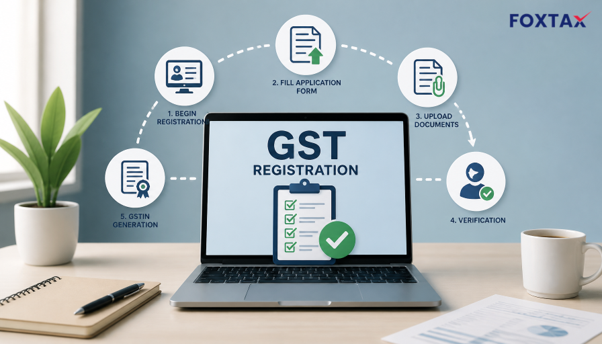
Post-introduction of the Goods and Services Tax (GST) regime, there have been major reforms in the indirect tax structure in India. Data available from the GST Network shows that there are over 1.4 crore valid registered taxpayers under the GST regime, and thousands of new registrations are submitted every working day. If you are looking for the GST registration process step by step, this guide walks you through the complete online journey from Form GST REG-01 to downloading your GST certificate.
Be it a small trader in Bengaluru, the founder of a new startup in Mumbai, or an e-commerce seller on the verge of scaling, make sure to know the step-by-step GST registration process before you start to sell your goods or services. Here is the complete guide for the entire process, from online registration to downloading the GST registration certificate.
What is the GST Registration Process?
Registration for GST is a purely online process to be carried out on the official GST Portal (gst.gov.in), where the applicant has to fill up Form GST REG-01 in the prescribed manner (both parts). Registration under GST refers to the process of registering a business under the indirect tax law, which makes the business eligible to charge and collect tax from customers, avail input tax credit and report for tax payments periodically.
You will finally get a Goods and Services Tax Identification Number (GSTIN). It is a 15-digit number which will be your business’s tax identity for all GST compliance. Once registered you will be able to download your GST certificate, issue tax invoices and trade legally between states.
What Are the GST Registration Steps?
The process of applying for GST registration is not complicated. The steps follow the structure of Form GST REG-01 and build upon one another. It is recommended to study these steps well before you apply for registration. Let’s go through these steps one by one:
Step 1: Fill Part A of Form GST REG-01 and Generate TRN
- Navigate to the GST Portal and Select New Registration
Start by visiting the official GST portal at gst.gov.in. First, click on the Services tab, then Registration, and then New Registration. You will get a drop-down menu from the portal. You need to select Taxpayer under the applicant type if you are not a GST Practitioner or other specified categories.
- Enter Your Basic Business Details
In Part A, you need to enter your Permanent Account Number (PAN), the legal name of the business as it appears in the records for the PAN, the state/union territory where you mainly operate, email ID, and mobile number. All information given in this part will constitute your GST account, so make sure to get this right in the first place.
- Complete OTP Verification and Obtain Your TRN
Once you’ve entered the captcha text and clicked on Proceed, the portal will simultaneously send OTP to your mobile number and email. Enter the OTPs to confirm your contact details. Once the portal has verified your details, you will get a 15-digit Temporary Reference Number (TRN) via SMS and email. You will need this TRN to continue to the next part of the application.
Step 2: Fill Part B with Business, Promoter, and Premises Details
- Log Back In Using Your TRN
Go back to the GST portal and navigate to Services > Registration > New Registration. Choose TRN instead of Taxpayer this time. Enter your TRN and captcha, and authenticate with the OTP received on your registered email and mobile number.
- Provide Detailed Business Information
Details like the constitution of business (i.e. whether it is proprietorship, partnership, LLP, private limited company, HUF, etc.), date of commencing business, types of business activities carried out and major goods/services involved are captured in Part B of the application.
- Add Promoter and Place of Business Details
Provide the PAN and Aadhaar of promoters, partners or directors as per the business structure. Principal place of business, and other places of business (address and proof of having the place of business).
Step 3: Upload Required Documents in PDF or JPEG Format
- Gather Entity-Specific Documents
For the documents which are required for various business constitutions:
- The proprietor will have to provide their own PAN and Aadhaar, photograph and proof of business address for a proprietorship.
- A partnership deed and documents of the partners for partnership firms.
- Incorporation certificate, MOA/AOA and board resolutions for companies and LLPs.
The submission of documents takes time and the whole process can be fast-tracked if the documents are kept ready before starting Part B.
- Prepare Documents in Accepted Formats
All uploaded documents need to be in JPEG/PDF file formats to the GST portal and ensure that the file sizes are not too big. Application rejection and clarification requests will result from blurry or large files.
- Upload and Link Documents to Relevant Fields
The portal will then ask you to upload documents for each of the details you entered. Address proof can include electricity bills, rent agreements, or property tax receipts. For bank verification, you can upload a canceled cheque or a bank statement displaying your account number. Ensure that you check whether the document being uploaded is relevant to the required field.
Step 4: Complete Aadhaar Authentication and Submit Application
- Complete Aadhaar Authentication if Prompted
In some registration categories, the portal will authenticate the primary authorized signatory via Aadhaar, by sending an OTP to the mobile number mapped to Aadhaar. Aadhaar authentication saves a lot of time in getting approval.
- Verify Using DSC or EVC
Apply through a Digital Signature Certificate (DSC) or EVC (Electronic Verification Code). Companies and LLPs are required to submit their application via DSC and sole proprietors/partnerships via EVC. The Digital Signature Certificate should be registered on the GST portal before submission of the application.
- Receive Your Application Reference Number (ARN)
Once you successfully submit, the portal will generate an Application Reference Number (ARN) and send it to your email ID and mobile number, which will act as an acknowledgment of your application and a reference number to track the status of your application. Carefully note this down for future reference.
Step 5: Officer Verification, Approval, and GSTIN Issuance
- Application Scrutinised by GST Officer
Once submitted, a tax officer screens your application and documents. If it is not questioned, the application is approved and no further communication will occur. If your application has errors or missing information, a clarification notice may be issued via Form GST REG-03.
- Respond to Clarification Notices Promptly
If you got a notice in Form REG-03, you need to respond in the given period with the proper form GST REG-04. In case your answer is found wrong, your application may be rejected under GST REG-05. Speed and thoroughness in answering prevents delay.
- Download Your GST Certificate
Once approved, you will be allotted the GST identification number and you can download the registration certificate (Form GST REG-06) from the portal. The certificate shall include the GST identification number, legal name, trade name, address and date of registration. Exhibit your registration certificate at the place of business.
What Documents Are Required for GST Registration?
The documents required vary by business type and having the right set in front of you before you start a GST new registration can save you a lot of time:
| Document Type | [Proprietorship](https://foxtax.in/service/sole-proprietorship-firm-registration/) | [Partnership](https://foxtax.in/service/partnership-firm-registration/) | [LLP](https://foxtax.in/service/llp-registration/) | [Private Limited](https://foxtax.in/service/private-limited-company-registration/) |
| PAN Card | Proprietor’s PAN | Firm PAN + Partners’ PAN | LLP PAN + Designated Partners’ PAN | Company PAN + Directors’ PAN |
| Aadhaar | Proprietor’s Aadhaar | Partners’ Aadhaar | Designated Partners’ Aadhaar | Directors’ Aadhaar |
| Photograph | Proprietor’s photo | Partners’ photos | Designated Partners’ photos | Directors’ photos |
| Business Address Proof | Electricity bill, rent agreement, NOC | Same | Same | Same |
| Constitution Document | Not applicable | Partnership deed | [LLP agreement](https://foxtax.in/blog/llp-agreement-business-benefits/) | Incorporation certificate, MOA, AOA |
| Authorisation | Not applicable | Letter of authorisation | Board resolution | Board resolution |
| Bank Proof | Cancelled cheque or bank statement | Same | Same | Same |
Additional documents may be required for specific categories such as SEZ units, casual taxable persons, or those registering under the composition scheme.
How Long Does GST Registration Take?
According to the guidelines of the official GST portal, the usual processing time for GST registration is between 3 to 7 working days from the date of ARN generation. The timeline assumes that your application is complete, your documents are correct and Aadhaar authentication has been successfully completed. The clock starts once you submit your application and receive the ARN – not when you initially start filling out Part A.
A number of factors can extend this time span considerably. If there is a clarification notice issued by the GST officer under REG-03, the process is extended by the time taken by you to respond which is generally 7 working days. If Aadhaar authentication is not opted for or fails, then physical verification of business premises may be required which will take additional days. Also, some states now require biometric Aadhaar verification at a GST Suvidha Kendra, which adds to the timeline.
In practice, most simple applications are approved within a week. In more complex cases where there are multiple states involved, address proof is unclear, or the business structure requires extensive documentation which can take up to 30 days.
How Much Does GST Registration Cost?
GST registration is free of cost from the government. The GST Portal does not charge anything for filing a new registration application, be it a proprietorship, partnership, LLP or company. This is an important clarification, as many applicants confuse the consultant charges with the government fees.
Your actual cost would include professional fees if you choose to hire a consultant or Chartered Accountant to handle your registration, which generally ranges between INR 1,500 to INR 5,000 depending on the complexity. Companies and LLPs also have to buy a Digital Signature Certificate, which will cost you anywhere between INR 1,000 and INR 2,000.
If you register late and have started to incur GST liability, you could be liable for penalties and interest on the unpaid tax from the date your liability started. These are on top of the cost of registration.
At Foxtax, we provide transparent GST registration services with no hidden charges. You will know exactly what you are paying for and why.
Registration Types Under GST: Normal, Composition, Casual, and More
This is not the same for all businesses. This article talks about the GST registration process for different types of taxpayers. Different taxpayers can obtain GST registration under different relevant schemes and compliance requirements. The bulk of the taxpayers fall under the normal taxpayer regime, which is meant for companies above the threshold limit and those dealing in inter-state supplies. Composition scheme registrants have less compliance and no input credit.
Casual taxable persons are persons who make occasional taxable supplies in a state in which they do not have a fixed establishment, such as traders at a trade fair. Non-resident taxable persons register for a limited period to carry on business in India. Input Service Distributors (ISD) register to distribute the input tax credit of the registered person among its branches. SEZ developers and units are registered to do business.
Choosing the right registration category upfront will save you headaches down the road. Initial registration for most small businesses should be done under normal taxpayer registration.
Common Mistakes to Avoid During GST Registration
A common mistake is the wrong matching of the legal name with the PAN, which can delay your registration by several weeks. Small spelling variations will automatically fail the eligibility check. Another common mistake is uploading address proofs which do not establish a connection of the business to the address, for example, a rent agreement without utility bills.
Problems can also be caused by an incorrect business constitution or by choosing the wrong type of registration. Make sure the documentation you upload is up-to-date and valid. Expired documentation is routinely rejected. Finally, if an applicant fails to respond to clarification notices within the time limit provided, the application is automatically rejected and has to be started again.
Foxtax has dedicated, highly experienced registration specialists who will double-check your application for any potential problems that could cause delays or rejection.
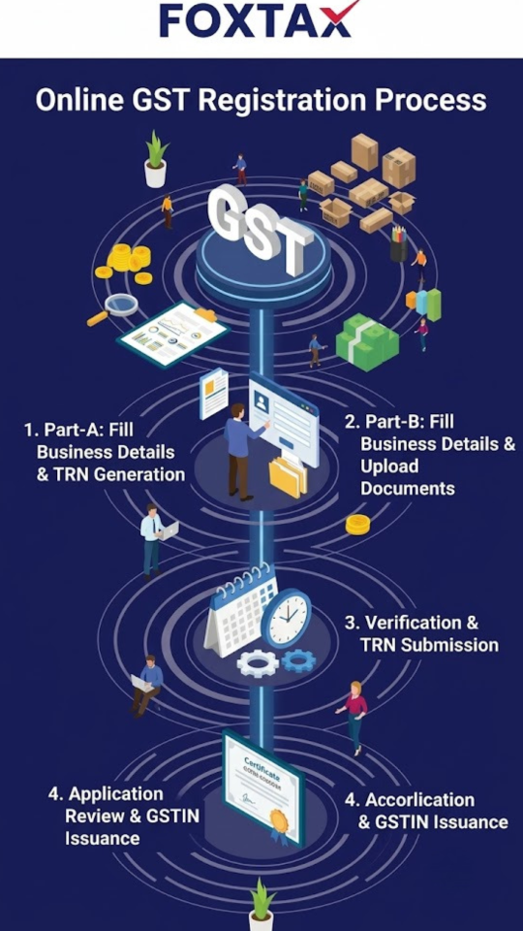
Quick Glance: GST Registration Process Checklist
- Visit gst.gov.in and navigate to Services > Registration > New Registration
- Complete Part A with PAN, business name, state, email ID, and mobile number
- Verify with OTP and save your 15-digit TRN
- Log in with the TRN to complete Part B
- Enter business, promoter, and premises details accurately
- Upload all necessary documents in PDF or JPEG format
- If asked, complete Aadhaar authentication
- File with DSC or EVC and save your ARN
- Track application status and respond quickly to notices
- Download your GST certificate upon approval
If you know every step and you have your documents ready beforehand, then the GST registration process step-by-step is easy to understand. For most applicants the whole process from creating your TRN to downloading your certificate can be done online and completed within a week. The trick is to fill in details correctly, document everything thoroughly, and respond promptly to any queries from any officer.
Foxtax makes GST compliance easier for businesses across India. We handle the entire registration process starting from document preparation to downloading the certificate so that you get your GSTIN without any undue delays. Whether you are registering for the first time or expanding into new states, Foxtax has the expertise to guide you through the process customized to your business.
Frequently Asked Questions
Is CA required for GST filing?
No, it is not mandatory to have a Chartered Accountant for GST registration and return filing. Any taxpayer can register themself on the GST portal and file returns himself. However, for companies and LLPs, the signing has to be done using a Digital Signature Certificate which requires a little technical setup. In more complicated scenarios like multi-state registrations, refund claims or answering a notice from a department, many companies choose to work with a CA or tax professional.
Can I register for GST in 3 days?
Yes, in many cases it is possible to register in 3 days. Usually, it takes 3 to 7 working days to get approved after your documents are complete and Aadhaar authentication is done successfully. Applications which do not face clarification notices and have all the details with matching PAN records, tend to get approved on the faster side of this range. Aadhaar authentication is usually quicker.
How much does GST registration cost?
The government fee for GST registration is zero. GST portal registration fee is free, you can complete the whole application on the GST portal. There will be costs involved if you need to take the help of a consultant or if you have to buy a Digital Signature Certificate for registration of your company or LLP. Consultant fees usually vary from INR 1,500 to INR 5,000, depending on the complexity of your application.
How many days to complete GST registration?
It usually takes 3 to 7 business days from the date you receive your ARN. If the officer issues a clarification notice, the process is extended by the response time (usually 7 working days for you to respond). This process may take 30 days if physical verification or additional documentation is required. Good documentation from the outset means fewer delays.