


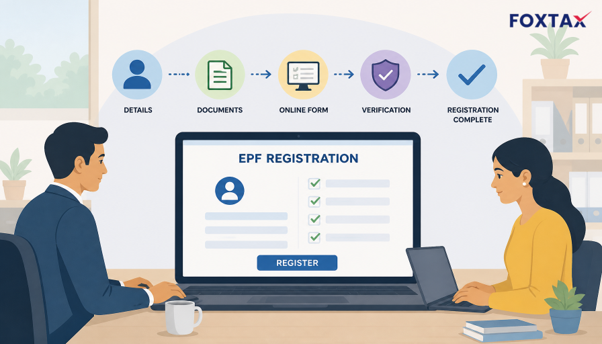
EPF registration for Indian employers is not simply a payroll thing. It is the start of employees’ retirement benefits and an obligation to register for EPF under the EPF Act, 1952. The ambiguity arises because “EPF registration” is used for two stages of getting ready for benefit saving – as an organisation, business, or company (establishment registration) or for each company member using the UAN (employee registration).
This guide explains both separation, EPFO online registration, and how to apply EPF without the check-box traps. Foxtax can assist with registration and enrollment.
What Is the EPF Registration Process?
The EPF registration process is the registration that gets the employer the PF code and gets the employee registered under the code and with a UAN number. Most searches combine the two, so first we need to determine which registration you actually require. The employer registers the entity while the employee activates and seeds his/her member account.
Employer Registration vs Employee Registration
Employer registration happens at the establishment level: the establishment requests an establishment code by registering through the EPFO employer portal or Shram Suvidha Portal, brings establishment information and documents, and receives the establishment registration number.
Employee registration happens at the employee level: the employer assigns a UAN, files enrolment data, and the employee activates UAN, completes e-KYC and files nomination. The employer code must be present before the employee’s EPF account can be created.
Who Must Register Under EPF?
Most establishments with 20 or more people are mandatorily covered under the EPF Act. Smaller establishments could choose voluntary cover; and the clock starts ticking as soon as the threshold is crossed.
Non-compliance could result in damages and interest if proceedings are initiated under the EPFO enforcement scheme, so earliest applicability check is recommended.
How to Apply for EPF Registration Online (EPFO Online Registration)
EPFO online registration is mostly a portal workflow, but it is the preparatory work before log-in that ensures the application goes through easily. Gather entity PAN, proof of Incorporation / Registration, address proof, and the Digital Signature Certificate of the authorised signatory.
Documents Required for EPF Registration
- Company PAN: The name on the PAN should match the entity name provided in the application; any mismatch is a frequent cause for queries.
- Certificate of Incorporation or equivalent: The incorporation certificate for a company; partnership deed, GST registration / shop and establishment registration for a firm or another entity.
- Proof of establishment address: The inputted address in the portal should be supported by any utility bill, rent agreement, ownership proof etc.
- DSC of the authorised signatory: The signatory DSC opens up the employer registration.
Step-by-Step EPFO Online Registration
- Access the EPFO Employer Portal or Visit the Shram Suvidha Portal: Access the portal via the official page and choose the option to register as an employer.
- Register the employer profile: Fill up the details of the authorized signatory and do DSC registration.
- Complete the business details: Enter the legal business name, how long the company has been trading, details of the company address, business type and number of staff employed.
- Upload files: Upload the PAN, proof of incorporation, proof of address and some annexures file based on the prescribed format.
- Send and record the reference number: Make sure you keep the acknowledgement so you can contact them again.
- Registration track: The code of the unit shall be assigned once the verification is successful. The time frames differ, so follow-up is necessary in case the application is questioned.
- Submit the first ECR: Submit the Electronic Challan cum Return and contribution by the 15th of the next month after allotting the code.
- Set up employee enrolment: Generate UANs and gather employee KYC details for seeding.
Acknowledgement, Approval Timeline and Establishment Code
This is confirmation of submission and not approval. Establishment code is the operational key for the employer to add employees and also submit ECR. If the application is pending or rejected, then verify DSC errors, PAN-name mismatch, address-proof, or duplicate establishment details.
How to Create an EPF Account for Employees (EPF Registration Process for Employee)
The EPF registration for employees follows after being allotted an establishment code by the employer. The employer assigns UAN for the employee and offers member details, after which the employee activates UAN and verifies KYC. This is also where “how to create EPF account” gets complicated.
UAN Allotment, Activation and e-KYC Seeding
The UAN is generated by the employer and given to the employee. The employee is responsible for activating the UAN on the EPFO member login portal, and then updating his/her details – Aadhaar, PAN, and bank account details using e-KYC, together with bank account seed, and filing a nomination. Login will display the member passbook and transfer requests once activated.
Common EPFO Questions for Employees
Can I open an EPF account myself?
No — typically a new establishment account is opened and an employee is enrolled by the employer in the EPF scheme; the employer will always have to have an establishment code. An existing UAN can be used to transfer to another employer without having to create another account. Employees can get activation, e-KYC, transfer, and nominations done themselves.
What are the new digital features in the EPFO 3.0 upgrade?
EPFO 3.0 is the announced digital modernisation of EPFO services (to make everything paperless and human-free). The announced roadmap sees more app-based claims, faster automation, and increased integration with employers’ data. Some announcements include ATM- or UPI-like withdrawal access, but the employer should check that that route is available before counting on it.
I forgot my EPFO password. What should I do?
On the employer or member portal, use the “forgot password” option and reset it using mobile number or email with OTP. Maintain UAN and establishment code. In case of failure of OTP, use the EPFO grievance portal or contact the field office and don’t share OTPs.
Final Checklist for EPF Registration Process
- Confirm whether the requirement is establishment EPF registration or employee enrolment.
- Verify the 20-employee threshold and the voluntary coverage status.
- Have PAN, proof of incorporation, proof of address and DSC prepared.
- Complete EPFO online registration and keep the acknowledgement.
- Track the allotment of establishment codes and file the first ECR.
- Generate UAN, activate it, fulfil e-KYC and file nomination.
- Check for basic mistakes before submitting.
EPF registration is simple if the employer and employee tracks are maintained separately and the document set is verified before uploading. Foxtax helps Indian employers with EPF registration, employee onboarding, and ongoing payroll compliance. Use this checklist as a practical guide, and verify any portal-specific steps on the official EPFO or Shram Suvidha Portal before filing.
FAQ
What happens to EPF after retirement?
On superannuation, the entire PF accumulated by the employee is payable. The pension part is included in EPS, and EDLI adds an insurance-oriented amount to the nominee. The old forms are Form 19 and Form 10C, but since present-day claims are more portal/app-based, taxability is conditioned by continuous service scenarios.
How long does EPF registration take?
Timelines vary with document verification and queries on the portal. The acknowledgement is received on the portal immediately after submission, but establishment code allotment can take from days to weeks. In case of queries, prompt follow-up is required.
What documents are required for PF registration?
The basic set is company PAN, certificate of incorporation or other registration record, establishment’s address proof and DSC of authorised signatory. Further annexures may be asked based on entity types.